FeedHub Review

I’ve been testing out FeedHub, a tool that organizes and filters your RSS feeds based on topics (“memes,” in FeedHub’s parlance) you express interest in. So far, I’ve found that it helps put things I want to read nearer the top of the list, although it doesn’t do as good a job as my own system of reading certain feeds first.
To get started with FeedHub, you need to set up an account and import an OPML file from your favorite aggregator. The signup procedure was a bit confusing; it wasn’t obvious to me that uploading an OPML file was a required part of the process. Once I figured that out, though, setting up an account was a breeze.
I exported an OPML file from Bloglines (over 120 feeds) and FeedHub started digesting it. The process took several hours; I was warned that it would be time consuming, and it was. When I came back to FeedHub the next day, it had finished its processing and offered me a new RSS feed to which I needed to subscribe to see my filtered feeds. So I added this new feed into Bloglines to monitor it.
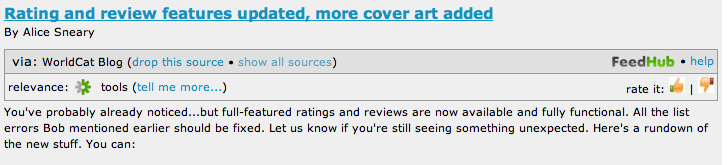
Within the FeedHub feed, each post is reproduced along with an indication of relevance, the memes FeedHub has assigned to the post, and a thumbs up/thumbs down rating icon. Sample (for a recent post in OCLC’s WorldCat blog, “Rating and review features updated, more cover art added‘):
FeedHub RSS Entry

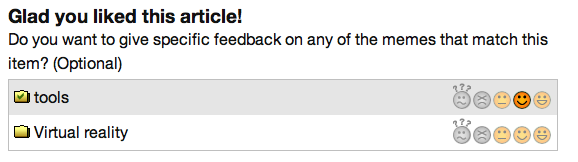
Once you click the appropriate rating thumb, a new window appears in which FeedHub displays its updated relevancy for that article and a series of memes that it has found for that particular post. You can then provide an importance for each meme in your overall reading interests. For example:

FeedHub Meme Rating

This post has been assigned two memes by FeedHub, “tools” and “virtual reality”. (The underlying software, mSpoke, is responsible for assigning memes to topics.) Next to each meme is a series of graphics, reflecting five options for rating that meme: “No opinion,” “No thanks,” “Sometimes,” “Usually,” and “Yes, please.” I’ve previously given the “tools” meme a “usually” rating but haven’t previously expressed an opinion about the Virtual reality meme.
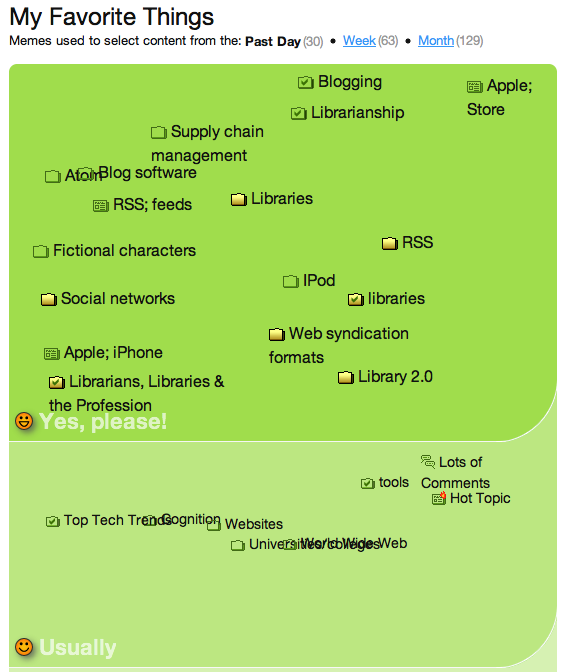
FeedHub can display all the memes it’s gathered to describe my reading interests. Here are the memes I’ve rated as “Yes, please” and “Usually:”
FeedHub Meme Rating

You can drag and drop individual memes from category to category, making it simple to update FeedHub’s settings. You can also add other memes via search interface or add memes that are based on source (i.e., “in popular feeds”, “in TechCrunch”, etc.) or that reflect social web sources — “on the del,icio.us hotlist”, “popular on Digg”, etc.).
So what’s the net effect of FeedHub on my blog reading? It’s been mixed in the week I’ve been testing it. I think I would have been happier had I given it a more homogeneous set of RSS feeds rather than everything — library-related, technology-related, blogs of friends that I follow, news, etc. I think it has a hard time initially figuring out what I actually want to read because the sources are so disparate. I have since pruned my FeedHub subscription list to be just library- and technology-related feeds, which seems to have improved its fidelity. (Or it could be that I’ve simply voted on more items, giving it a better sense of what I actually like.)
FeedHub also notes which blog posts I click through to read at the source site. Since most blog posts are published in their entirety in the RSS feed, I’m not sure how useful this is; I rarely go to the blog’s site to read a post.
Overall, I’m intrigued by the tool and plan to keep using it. However, I’m not yet ready to ditch my entire feed collection as individual posts in favor of FeedHub’s filtered approach.

Arms Research Digital Library Feed

The Combined Arms Research Library at Fort Leavenworth now has an RSS feed for new items in their digital library. The feed, at http://cgsc.leavenworth.army.mil/CARL/rss/generate_rss.asp?feed=carl_dl, includes items from their military history, MA of Military Art & Sciences theses, World War II Operational Documents, and more.
There’s a wealth of information here… And if you ever want to know how the Army measured soldiers’ feet during World War I, here’s your chance to find out: Army foot measuring and shoe fitting system.

Geotagging Photos When You Take Them

I wrote about geotagging photographs way back in the fall of 2006. This means attaching longitude and latitude data to a photograph so it can be mapped. Most shutterbugs who geotag their photos do so after the fact, using various mechanisms, in Flickr or with iPhoto plug-ins, for example.
Now, it seems, easy geotagging of photo easy will be added to Apple’s iPhone — at least, according to one report at AppleInsider. If the iPhone does have GPS (or even if it relies on the current mechanism of approximating the iPhone’s location, by triangulating on cell phone towers), every picture taken with an iPhone could have location data attached.
Depending on the resolution of the location, it would be possible to build collections of photos from multiple users over time of a given location.
Of course, the privacy implications are interesting, too — will a photograph taken of someone without the subject’s knowledge, published to Flickr with a geotag, be considered evidence of that person’s whereabouts? This expands the risks to privacy already created by CCTV systems, such as those installed in many cities (Singapore, London, etc.). If everyone has a camera with geotagging capability built in, and publishes their photos to the Internet — how easy will it be to scan them to learn if a person suspected of being at that location at a particular time might be in the background?

The Reader Wars

How do you read your RSS feeds? Chances are, you use either Bloglines or Google Reader, the two market leaders. A recent report, ‘Google Reader Slowly Closing on Bloglines‘ by Heather Hopkins of Hitwise shows how the gap is closing:

Share of US Internet Visits

Hitwise doesn’t show market share of blog readers directly, but market share of total internet usage; according to this calculation, Bloglines has a 40% lead on Google reader’s market share of internet visits.
These stats are more or less mirrored on RSS4Lib. Looking at my user stats for May 21, 2008, this blog had a total of 1851 feed subscribers, of whom 831 were from Bloglines and 568 were from Google Reader. (See my Counting RSS Subscribers post from a year ago where I discuss my methodology.) This translates into Bloglines having a 44.9% share of my feed subscribers to Google’s 30.1% share, or 49% more than Google. Netvibes is 3rd for aggregators among RSS4lib subscribers (with an almost 13% share of RSS4Lib feed subscribers), while Rojo (3rd overall, according to Hitwise) is a far distant contender for RSS4Lib readers with 8 subscribers.
I’m a diehard Bloglines user myself but I see myself slipping into the minority. What tool do you use, and why?

Snazzy Icons for iPhone/iPod Touch Web Clips

Apple’s iPhone and iPod Touch allow users to save “web clips” — favorite web pages — directly to the device’s home screen — so one tap of the finger on the icon takes you directly to that site. By default, the iPhone or iPod Touch use a nearly-impossible-to-read screen shot to represent the web clip; few web sites end up being visually identifiable on the home screen.
There’s a great opportunity for branding here. Apple has made it very easy to create custom icons for your web site. There are 2 steps:

  1. Make a graphic that is 57 x 57 pixels and save it in PNG format.
  2. Name this file apple-touch-icon.png and save it to the main (“root”) level of your web server.

(Credit to The Primary Vivid Weblog for documenting the process in plain English.)
When you add a web clip to your iPhone or iPod Touch’s home screen, it automatically (and unavoidably) adds a glow effect and rounded corners to the graphic you provide. To compensate for this, use this web clip Photoshop template (from iPhoneMinds) that shows just where the usable space in that 57 x 57 pixel square is and how it will look with the glow effect.
How easy is it? It took me (a truly novice Photoshop user) about 5 minutes to make an icon for RSS4Lib — if you’re using an iPhone or iPod Touch, save this page to your home screen to see it, or just view http://www.rss4lib.com/apple-touch-icon.png.
If your library has iPhone or iPod Touch users, why not extend your brand to their mobile desktop?

RSS Feeds & Copyright

Copyright and fair use are poorly understood in the population at large (just ask high school teachers or college professors how much time they spend vetting submitted papers for flagrant — let alone subtle — plagiarism). However, syndication technologies such as RSS and Atom make it so easy to repurpose works that what’s proper — morally or legally — is often overlooked. After all, feeds are purpose built to make content portable. If the author did not want others to copy the content, the author would not send it out in a format designed for its simple syndication.
The Australian magazine PC World runs an interesting article by Larry Borsato: “Who owns ‘public’ content? RSS feed ownership brought into question.” In the article, Borsato recounts a recent incident in which a commercial entity reproduced, in toto, his blog posts via RSS on its web site. While Borsato has a Creative Commons non-commercial attribution license, he felt the commercial entity had violated it; they were, after all, a commercial entity. While the question was resolved amicably, it highlights, once again, the difference between how copyright is frequently viewed in the syndicated environment from how it is often seen in the print world. Borsato concludes:

In the same way that I can’t reprint a Harry Potter book and start selling it for my own gain, we need to realize that we can’t do that with RSS feeds or other Web content either. While Fair Use is OK, you can’t just start lifting and reusing entire bodies of work without permission.

Like many other facets of life in the Internet age, technological possibility is outstripping common practice — and often outstripping common sense. Some of this particular misconception, about what can legitimately be done with online content, can be cleared up through experience and training. Some of it will inevitably be resolved through better technological solutions. But when it comes down to it, we as bloggers must take greater responsibility for tracking how our content is used.

Tagging’s Long Tail

Tagging systems offer a fascinating opportunity to study how people tag and what collective wisdom can be generated from the masses. Tim Spalding, in his a recent post at Thingology, The Long Tail of Ann Coulter, observes that tag use in LibraryThing resembles the Long Tail principle. That is, a few tags are used a great deal to describe a given item, while other tags are used just once. These singleton tags reflect the idiosyncratic nature of individual taggers.
I’ve been thinking about the value of these singleton tags, without conclusive results, in connection with MTagger, the tagging application we built at the University of Michigan library. With the 8.5 million items in the library catalog, or even the 55,000 web pages on our site, will enough tags ever be applied to enough items to make it a useful mode for a newcomer to find an individual item, or are they just an aide-memoire for the person who applied them? In other words, do tags way off in the Long Tail matter?
The more I’ve pondered this, the more I realize that it’s not an either-or question. Tagging, at least in the library environment, is most valuable as a personal collection tool. It offers a way for library users to bring together things that seem similar to them for their own purposes. The real value of tagging is like that of a library: it’s the collections, the constructed universe of things that someone (a librarian, a subject expert, a user) brought together. While my tags may prove of no value to anyone else in finding a particular item, the mass of items I’ve used that idiosyncratic tag on may very well guide a future user in resource discovery.

Academic Institutions on Facebook

Melissa Cheater at the Academica blog compiled a survey of institutions of higher education with a presence Facebook and published a post titled “How higher ed is using Facebook Pages.”
She found more than 420 IHE-related Facebook Pages. It is interesting to note that Facebook does not provide a standard way to identify authorship — so she was unable to determine who published the page: the school, a staff or faculty member, or someone who thought there should be one? This poses an interesting question of “authority” — how reliable are Facebook Pages as sites of valid and trusted information?
The full post is worth a read.

High Tolerance for Ambiguity

The 2.0 world — in libraries in particular, or the web in general — is helping to address the information management problem of ambiguity. In his inaugural column in the May issue of KMWorld,” Now, everything is fragmented,” David Snowden notes: “The more you structure material, the more you summarize (either as an editor or using technology), the more you make material specific to a context or time, the less utility that material has as things change…”
Much of what the knowledge management world, and, for that matter, librarians more broadly, seek to accomplish is to get the right bit of information to the person who is looking for it at the right time. However, as we build systems to accomplish that task, we often run counter to both the defining characteristic of our age and what he describes as one of the defining characteristics of our species. Snowden writes:
First, we live in a world subject to constant change, and it’s better to blend fragments at the time of need than attempt to anticipate all needs. We are moving from attempting to anticipate the future to creating an attitude and capability of anticipatory awareness. Second, we are homo sapiens at least in part because we were first homo narrans: the storytelling ape. Dealing with anecdotal material from multiple sources and creating our own stories in turn has been a critical part of our evolutionary development.
Information systems are typically built to remove ambiguity. They are tailored to the specific need at hand. Snowden notes that there is a risk to building systems that remove ambiguity by “chunking” information into discrete elements. This risk is shown through research (in national security, in particular) that indicates raw intelligence is more useful over longer periods of time than the reports based on that raw data. 2.0 environments, in which users of information build on the raw materials, mixing and matching sources in novel ways, are more flexible, allowing for changing needs to reflect themselves over time.
A mentor and twice-supervisor of mine described someone’s ability to survive in an organization by saying that the individual either had or lacked a “high tolerance for ambiguity.” Having a high tolerance was a good thing: if you could keep your relative sanity as organizational priorities and day-to-day exigencies changed, you were in good shape. As librarians, we need to develop a high tolerance for ambiguity in the information systems we design and provide. By this, I don’t mean developing to wishy-washy specifications. I do mean that we need to build systems that enable our users to pursue information-seeking paths we don’t, or can’t, anticipate. Systems must be built to allow others to get to the raw data, manipulate it, and do what they will. As we today’s information needs, we must also allow for flexible interpretation and serendipity of discovery.