New Pew Survey on Blogging and Blog Readership

The Pew Internet & American Life Project released a summary of a spring survey on bloggers and blog readers: New Numbers for Blogging and Blog Readership.
Although the full report is not presented, some summary information is. These points are of note in the report’s discussion about blog readership:

  • “33% of internet users (the equivalent of 24% of all adults) say they read blogs, with 11% of internet users doing so on a typical day.”
  • “42% of internet users (representing 32% of all adults)” say they have, at some time, read a blog or online journal.
  • Men and women in this study are equally likely to say that they currently read other people’s blogs (35% for men, 32% for women)
  • Men are more likely than women to say that they have read other people’s blogs at some point in the past (48% vs. 38%). Pew speculates that this difference is because men “are generally heavily represented among the early adopters for most technologies, but women catch up over time.”

Items of note in the discussion about blog authorship:

  • “12% of internet users (representing 9% of all adults) say they ever create or work on their own online journal or blog.”
  • “For a majority of bloggers, working on their blog is not an every-day activity: 5% of internet users blog on a typical day.”

If a quarter of all adults say they read blogs on a daily basis, I wonder what additional percentage read blogs without knowing it? I also wonder what percentage of the currently active blog-reading population does so via RSS, and if they realize they’re reading a blog when they go to Google Reader or Bloglines.

Via Rich at J’s Scratchpad
New Google Wannabe: Cuil

A new search engine created by ex-Googlers went public today: Cuil, pronounced, the site tells us, “cool;” it’s the Gaelic for “knowledge.” (And “hazel,” which seems less relevant.) The site seems to be suffering a bit from newcomer’s paralysis — the info page is currently not loading and some searches are timing out. Cuil claims to have indexed 120 billion pages, more than Google (which knows about over a trillion, but only indexes a small portion — though just how small, or large, Google’s not saying).
At first blush, I like Cuil’s layout. It presents results in two or three columns (you decide). Many results come with a small thumbnail image. In some cases, though, the image was of questionable relationship to the search; images were not present on the page you link to in a few cases. How images are applied is a mystery to me.

Cuil search results

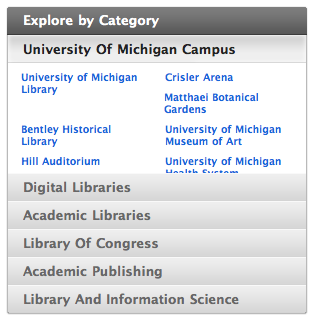
A search for “"University of Michigan Library"” (a phrase, including the quotes) finds it. It also presents “categories” of results on the right, with nicely bundled results.

Cuil categories for search

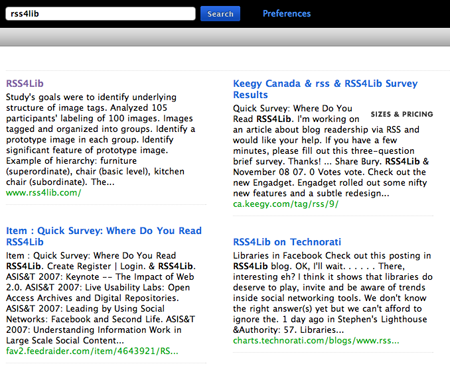
However, its currency is a bit poor, at least for low-traffic sites like RSS4Lib. A search at Cuil for RSS4Lib pulls up the main page as the first result, but the text shown dates from October 2007, quite a few posts ago).
There’s no apparent way to save a search alert (by email or RSS), which is unfortunate, as that seems to me to be just part of doing business. The interface, though, is quite clean and (at least for now) free of advertising. I’ll be curious to see how this new search tool develops.
For those of you who enjoying poring through your servers log files, Cuil is powered by the “twiceler” crawler you may noticed going through your site.

Search Flickr for Color Schemes

The Multicolr Search Lab site lets you search through 3 million Flickr images for those that match a particular color. You can pick one or more colors from a swatch on that web page and it will display Flickr image thumbnails that contain the color (or colors) you pick. Assuming the photographer allows use of the images, you could use them to jazz up your web site with color-coordinated graphics. Of course, you still need to find one that suits your content.
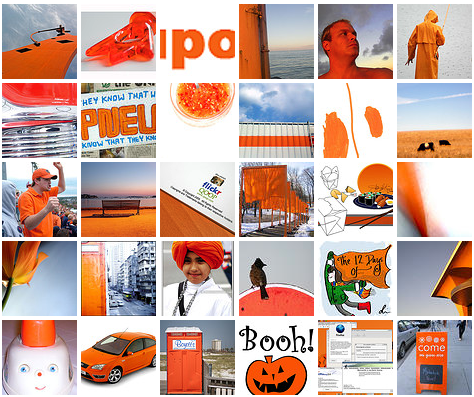
If you’re not satisfied with the 144 colors offered, you can easily customize the tool to add the exact colors on your web page. For example, RSS4Lib uses three main colors: orange (#f1671f), dark blue-gray (#a3b8cc), and light blue-gray (#e6e2f2). By adding these to the site’s URL, as in this sample, I can get a customized set of images that match RSS4Lib’s color scheme.

RSS4Lib Color Swatch

This was generated from the following URL:
http://labs.ideeinc.com/multicolr/#colors=f1671f,a3b8cc,e6e2f2;
If you wanted to use your own colors, simply replace the 6-character color codes (in my example, the bolded f1671f, a3b8cc, and e6e2f2) with the colors you want to use. Add more by separating them with commas (no spaces!). End the list of colors with a semicolon.

FeedSifter — Search Within the Feed

Do you ever subscribe to RSS feeds that have huge amounts of information, just to get the occasional post that mentions a particular topic or two? Yeah, me too. FeedSifter is just the tool for us. Enter an RSS feed URL and one or more words or phrases, and it will build you a version of the RSS feed that contains only entries matching one or more of your requested words. It allows for basic Boolean searching. Words or phrases entered on one line are joined by “AND”; words or phrases on separate lines are joined by “OR.”
A few examples:

The resulting page is, itself, an RSS feed that you can subscribe to in your aggregator or save as a live bookmark in your browser. Or incorporate the sifted feed into a web page using Google’s RSS embedding tool. I can see an obvious use for this tool at the library reference desk. This makes an easy way to set up a quick-and-dirty current awareness feed for patrons, based on news services or journal table of contents, that can tell them when something new has been published in a narrow area.